Watch a claim or protect a document
Provide a source link, report, memo, paper, or plan. Choose the claims that matter and the sources SourceTrace can access.
 SourceTrace
 checks the sources behind your claims. It shows which statements and calculations in your work depend on them.
ChatGPT and Codex plugin · In private testing
Public installation will open after OpenAI review.
Start with a claim or a document. SourceTrace records what the evidence says and where you use it.
Provide a source link, report, memo, paper, or plan. Choose the claims that matter and the sources SourceTrace can access.
SourceTrace keeps the year, units, country, and scope of a claim. It also records whether a number is an estimate or an actual result.
Use a manual check whenever you need one. Scheduled checks use OpenAI's built-in tools and depend on your account and source access.
A change report connects a revised source claim to the statements, calculations, and decisions that use it. Your document stays unchanged unless you ask for edits.
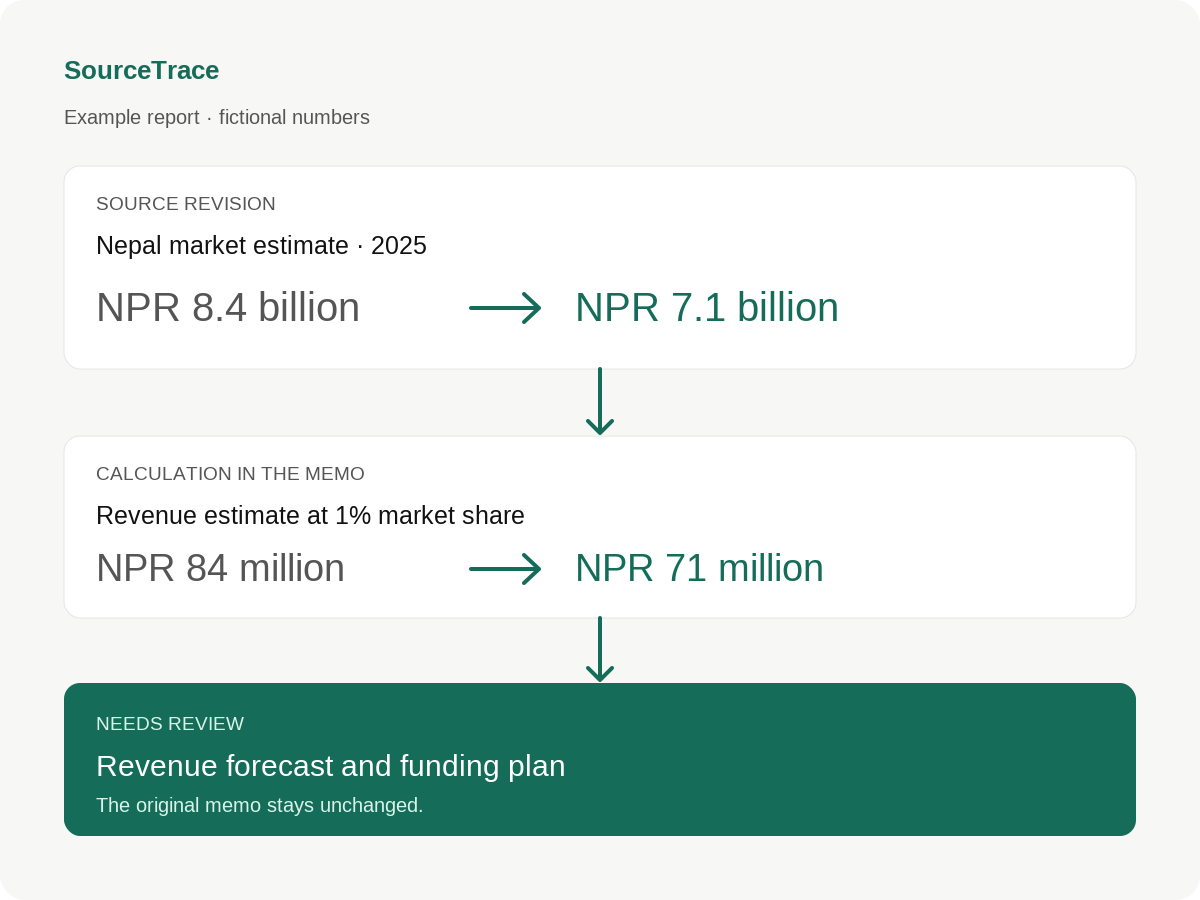
A fictional founder's memo uses a 2025 Nepal market estimate of NPR 8.4 billion. At 1% market share, the memo estimates NPR 84 million in revenue.
The source later revises the market estimate to NPR 7.1 billion. SourceTrace recalculates the revenue estimate and flags the funding plan that uses it.
The year, country, and status as an estimate stay attached to the claim. The result is still an estimate, not reported revenue.
Once installed, ask SourceTrace to check or watch your work. Attach the document or provide the source link.
Protect the claims in this report.
You can also ask it to watch one claim or check a document's sources once.
This short, fictional memo includes three source snapshots and five statements to check. Use it for a one-time check in ChatGPT or Codex.
1. Download the memo. It contains the sample evidence, so you can try it without a private document.
Download sample memo2. Attach it to your chat and copy this request. SourceTrace is in private testing. The sample also works as a plain source-check request.
SourceTrace is in private testing. This page describes the plugin we are preparing for public review. We will add a public install link when the directory release is available.
SourceTrace is a package of skills for ChatGPT and Codex. It has no separate server or account. OpenAI runs the checks, and a schedule is active only when OpenAI confirms it. Available tools and scheduling features vary by account and product.
SourceTrace reports the access gap. Failed access does not count as a changed fact. Later checks may also be unable to reopen uploaded files or read earlier results. You can keep the saved record and check it manually.
SourceTrace checks for changes that affect the tracked claim. A formatting edit does not count as a factual revision. Alert delivery and quiet runs depend on OpenAI's scheduling and notification features.
OpenAI processes the material you choose to check. Source checks may also contact public websites or services you have connected. The plugin does not send your documents to a HimAI backend. Read the SourceTrace privacy policy for details.
SourceTrace checks what the available sources support. Sources and AI can be wrong. Review the evidence before using a result for an important decision.
For questions or a problem with a check, email support@himai.com.np. Include the plugin version and a short description of what happened.
Remove private documents and account details from anything you send. We do not need passwords or API keys.